Reading time: 5 min read
The Basic Checklist for Sitecore XM Cloud Content Serialization
Get to know the basic list of items when synchronizing XM cloud content and project code repository through serialization
Start typing to search...
Get to know the basic list of items when synchronizing XM cloud content and project code repository through serialization
All elements within XM Cloud are items, including content, configurations, and customizations. Certain items are closely linked to developer-provided functionalities. Therefore, it's logical to serialize these items into files within the source code repository to maintain control during development. Here we are discussing the basic checklist for content serialization in XM Cloud.
Sitecore Content Serialization in XM Cloud is able to connect through the Content Management API. It's capable of both retrieving items from XM Cloud in YML format to the local environment and pushing the item representations stored in our local file system to an XM Cloud instance. Serialization helps to synchronize content across different environments like Dev, QA, Staging, etc. It also helps developers to synchronize their environments when using XM Cloud with Docker.
The Sitecore content serialization configuration encompasses two primary components: the sitecore.json file and files ending with the .module.json extension.
The sitecore.json file is situated in the root directory of your solution and is provided with the XM Cloud Starter Kit. Within this file, we can specify which .module.json files should be included for serialization, define plugins along with their respective versions, and set general serialization preferences.
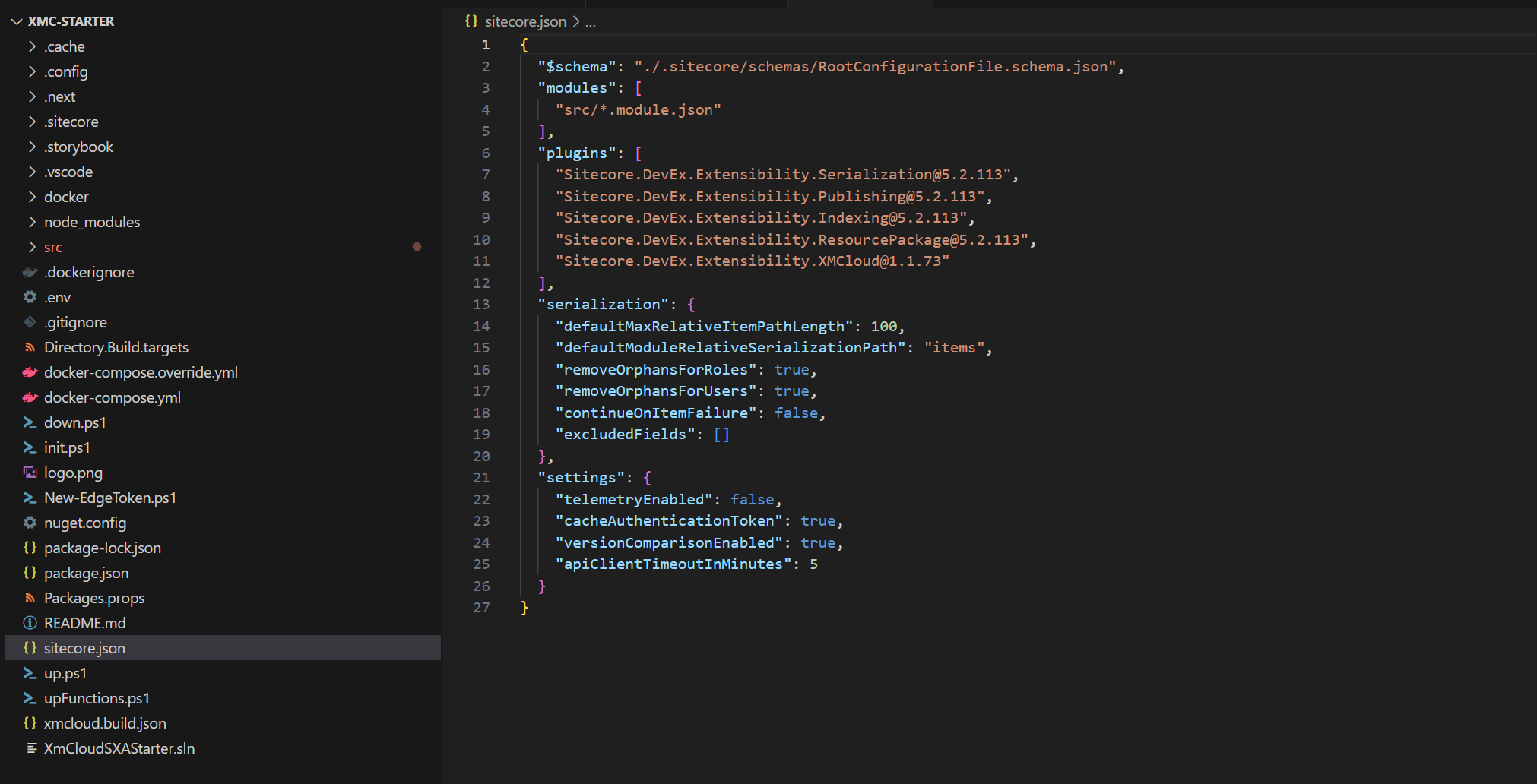
Within the modules section, all files ending with .module.json in the source folder are considered for determining which items should be serialized and which should be excluded. In the XM Cloud Starter Kit, there is a file renderinghost.module.json which can be referred to as an example. There can be multiple module.json files. Please refer to our other article on adding new items to your XM Cloud serialization.
Templates
/sitecore/templates/Project/
/sitecore/templates/Feature/
Branch Templates
/sitecore/templates/Branches/Project/
/sitecore/templates/Branches/Feature/
Modules
/sitecore/system/settings/project
Media library folder with the shared and site-related folders only, not including any media assets
/sitecore/Media Library/Project/
Custom Layouts
/sitecore/Layout/Layouts/Project/
/sitecore/Layout/Layouts/Feature/
Rendering Items
/sitecore/Layout/Renderings/Project/
Placeholder Setting
/sitecore/Layout/Placeholder Settings/Project/
Site Collection Root Item
/sitecore/Layout/Placeholder Settings/Project/
Site Root item with rules for media, data, dictionary, settings, and presentation items
/sitecore/content/<SITE_COLLECTION_NAME>/<SITE_NAME>
A sample module.json file looks like the below. The site collection name and site name can be replaced with your project specific details
  {
    "$schema": "../.sitecore/schemas/ModuleFile.schema.json",
    "namespace": "Project.<SITE_COLLECTION_NAME>",
    "items": {
      "includes": [
        {
          "name": "module",
          "path": "/sitecore/system/settings/Project/<SITE_COLLECTION_NAME>",
          "allowedPushOperations": "CreateUpdateAndDelete"
        },
        {
          "name": "templatesProject",
          "path": "/sitecore/templates/Project/<SITE_COLLECTION_NAME>",
          "allowedPushOperations": "CreateUpdateAndDelete"
        },
        {
          "name": "branchesProject",
          "path": "/sitecore/templates/Branches/Project/<SITE_COLLECTION_NAME>",
          "allowedPushOperations": "CreateUpdateAndDelete"
        },
        {
          "name": "projectMediaFolders",
          "path": "/sitecore/Media Library/Project/<SITE_COLLECTION_NAME>",
          "rules": [
            {
              "path": "/shared",
              "scope": "SingleItem",
              "allowedPushOperations": "CreateOnly"
            },
            {
              "path": "/<SITE_NAME>",
              "scope": "SingleItem",
              "allowedPushOperations": "CreateOnly"
            }
          ]
        },
        {
          "name": "layoutsProject",
          "path": "/sitecore/Layout/Layouts/Project/<SITE_COLLECTION_NAME>",
          "allowedPushOperations": "CreateUpdateAndDelete"
        },
        {
          "name": "projectRenderings",
          "path": "/sitecore/Layout/Renderings/Project/<SITE_COLLECTION_NAME>",
          "allowedPushOperations": "CreateUpdateAndDelete"
        },
        {
          "name": "projectPlaceholderSettings",
          "path": "/sitecore/Layout/Placeholder Settings/Project/<SITE_COLLECTION_NAME>",
          "allowedPushOperations": "CreateUpdateAndDelete"
        },
        {
          "name": "tenantRoot",
          "path": "/sitecore/content/<SITE_COLLECTION_NAME>",
          "scope": "SingleItem",
          "allowedPushOperations": "CreateAndUpdate"
        },
        {
          "name": "site",
          "path": "/sitecore/content/<SITE_COLLECTION_NAME>/<SITE_NAME>",
          "rules": [
            {
              "path": "/home",
              "scope": "SingleItem",
              "allowedPushOperations": "CreateOnly"
            },
            {
              "path": "/Media",
              "scope": "SingleItem",
              "allowedPushOperations": "CreateAndUpdate"
            },
            {
              "path": "/Data",
              "scope": "ItemAndChildren",
              "allowedPushOperations": "CreateAndUpdate"
            },
            {
              "path": "/Dictionary",
              "scope": "ItemAndDescendants",
              "allowedPushOperations": "CreateOnly"
            },
            {
              "path": "/Presentation",
              "scope": "ItemAndDescendants",
              "allowedPushOperations": "CreateUpdateAndDelete"
            },
            {
              "path": "/Settings/Site Grouping",
              "scope": "ItemAndDescendants",
              "allowedPushOperations": "CreateOnly"
            },
            {
              "path": "/Settings",
              "scope": "ItemAndChildren",
              "allowedPushOperations": "CreateAndUpdate"
            },
            {
              "path": "*",
              "scope": "Ignored"
            }
          ]
        }
      ]
    }
  }
These are the basic items that should be included for serialization. According to one’s project, the necessary items can be included. Sitecore Content Serialization serves as a powerful tool, allowing developers and content managers to optimize workflows, boost collaboration, and maintain uniformity across environments. Utilizing serialization ensures that your Sitecore projects are scalable, dependable, and straightforward to manage.