Reading time: 4 min read
Running Prettier from the Command Line
Prettier has become the household name for code formatting and it's gaining much publicity over the years and millions of developers around the world utilize this powerful tool to format code base for production ready. Currently, based on Visual Studio code IDE, there are over 30 million users around the globe and over 420 companies utilizing this tool according to stackshare and the increase in utility is still counting.
Prettier is an opinionated code formatter with support for some programming languages, frontend frameworks and CSS frameworks. It is Eslint on steroids, fully automatic, it enforces code styling consistency across the code base. This is made possible by its ability to parse away original styling and re-print the parsed AST (Abstract Syntax Tree) with its own rules that take the maximum line length into account and wrap codes when it is necessary.
Benefits to a Developer?
Prettier have helped to speed up code writing where an individual does not have to worry about code formatting which used to be a developer’s nightmare, it is customizable, runs offline and is completely free. It boosts up developer’s accuracy level, knowing that Prettier got you! No matter how messy the code is, prettier properly configured in your IDE will format all messy code in a blink.
Prettier Installation
Prettier can be installed through VS Code IDE extensions by searching for “Prettier - code formatter” in visual studio code marketplace and clicking on it. When it is opened, you can review it and click the install button. This is available in VSCode IDE. You can also download it via visual studio code marketplace.
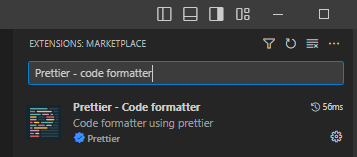
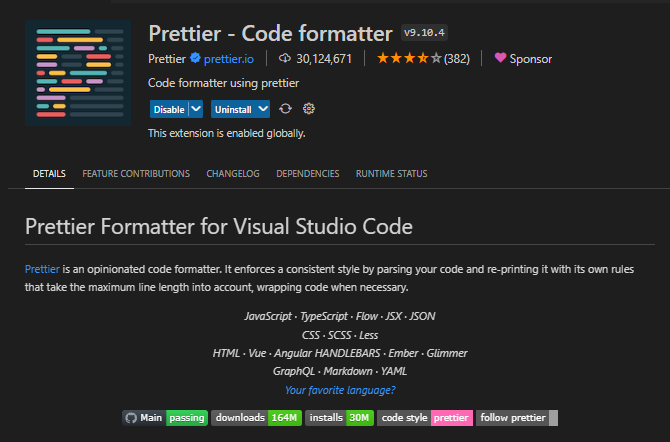
Prettier can also be installed in VS Code by launching VS Code Quick Open (Ctrl + P), and paste the following command and hit enter.
ext install esbenp.prettier-vscode

If you have a pre-installed formatter in your IDE, to ensure this extension is used over other extensions, set Prettier as the default formatter in your IDE settings. You can either set it to all languages or by a specific language of your choosing.
{
  "editor.defaultFormatter": "esbenp.prettier-vscode",
  "[javascript]": {
    "editor.defaultFormatter": "esbenp.prettier-vscode"
  }
}
If you want to exempt a particular language to not use Prettier as a default formatter, you can have your settings this way.
{
  "editor.defaultFormatter": "esbenp.prettier-vscode",
  "[javascript]": {
    "editor.defaultFormatter": "<another formatter>"
  }
}
Additionally, you have the option of disabling format on save for specific languages if you do not want autosave on them. Simply set the editor.formatOnSave to false
{
  "[javascript]": {
    "editor.formatOnSave": false
  }
}
For Prettier to run in your terminal, you must install Prettier in your project’s local dependencies.
-
npm / yarn
npm install --save-dev --save-exact prettieryarn add --save-dev --save-exact prettier
After the installation is complete, create an empty config file.
echo {}> .prettierrc.json
You can create this file manually in your project root directory and populate the file based on preference.
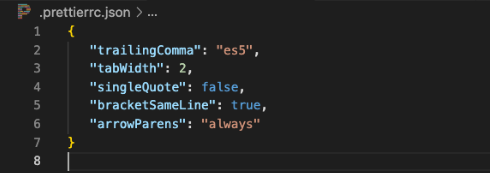
Next is to create a .prettierignore file in your project root directory and specify which file to not format.
# Ignore artifacts:
build
coverage

# Ignore all HTML files:
*.html
Tip: Add your .prettierignore file inside your .gitignore file and .eslintignore if they exist.
For ease of command run, add the following command script to your script object in your package.json file specifying the files to target by providing the path to the file inside of the curly bracket. The example shown below:
"format": "prettier --loglevel warn --write \"{<file-path>}/**/*.{jsx,js}\"",
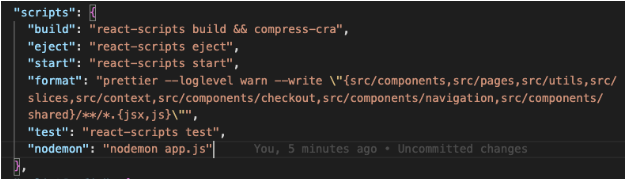
The example above is from a project on a mac os.
Now format all files with Prettier by running - npm run format in your terminal. This command will pick up “format” inside “script” in your project’s package. JSON file.
npm run format
Alternatively;
NPM
npx prettier --write .
YARN
yarn prettier --write .
This will apply prettier to all files in your project. If you only want to perform this command on a particular folder, you can “cd” into the folder and run the command.
Prettier Resources: